Channel Manager: Booking.com and Expedia reservations on one tape chart
Short answer: a channel manager automatically keeps your hotel's availability in sync with online travel agencies (OTAs) such as Booking.com and Expedia. In uMehmon, an OTA booking is assigned to a free room of the matching type, turns red on the tape chart, triggers a notification on every staff screen, and your occupancy is pushed back to the OTA, which sharply reduces the risk of double bookings. Today Booking.com and Expedia run over iCal; API connections are enabled with a certified connectivity account.
What is a channel manager and what problem does it solve?
Picture a 25-room hotel in Tashkent, Samarkand or any city in the region. Bookings arrive from Booking.com, from Expedia, by phone and through messaging apps. Every channel keeps its own calendar. When a Booking.com reservation comes in, the front desk has to close the same dates on Expedia by hand. Miss it once, or get delayed by a busy check-in, and the room sells twice. That is a double booking, or overbooking: the guest arrives with a confirmation and the room is already taken.
A channel manager acts as the bridge between your property management system (PMS) and the OTAs:
- it pulls OTA reservations into the PMS automatically;
- it pushes PMS availability back to every connected channel;
- it detects cancellations and reopens the room for sale;
- it removes the need to juggle several extranet tabs all day.
For a broader explanation of the concept, read what is a channel manager. This page focuses on how the uMehmon Channel Manager actually works, which channels are live today and which ones are still on the roadmap.
How does the uMehmon Channel Manager work?
In uMehmon the channel manager is not a separate product bolted on the side. It is built into the hotel PMS, so reservations, the tape chart, the cash desk, E-mehmon guest registration and channels share one database. Nothing has to be copied between systems.
What happens when a booking arrives?
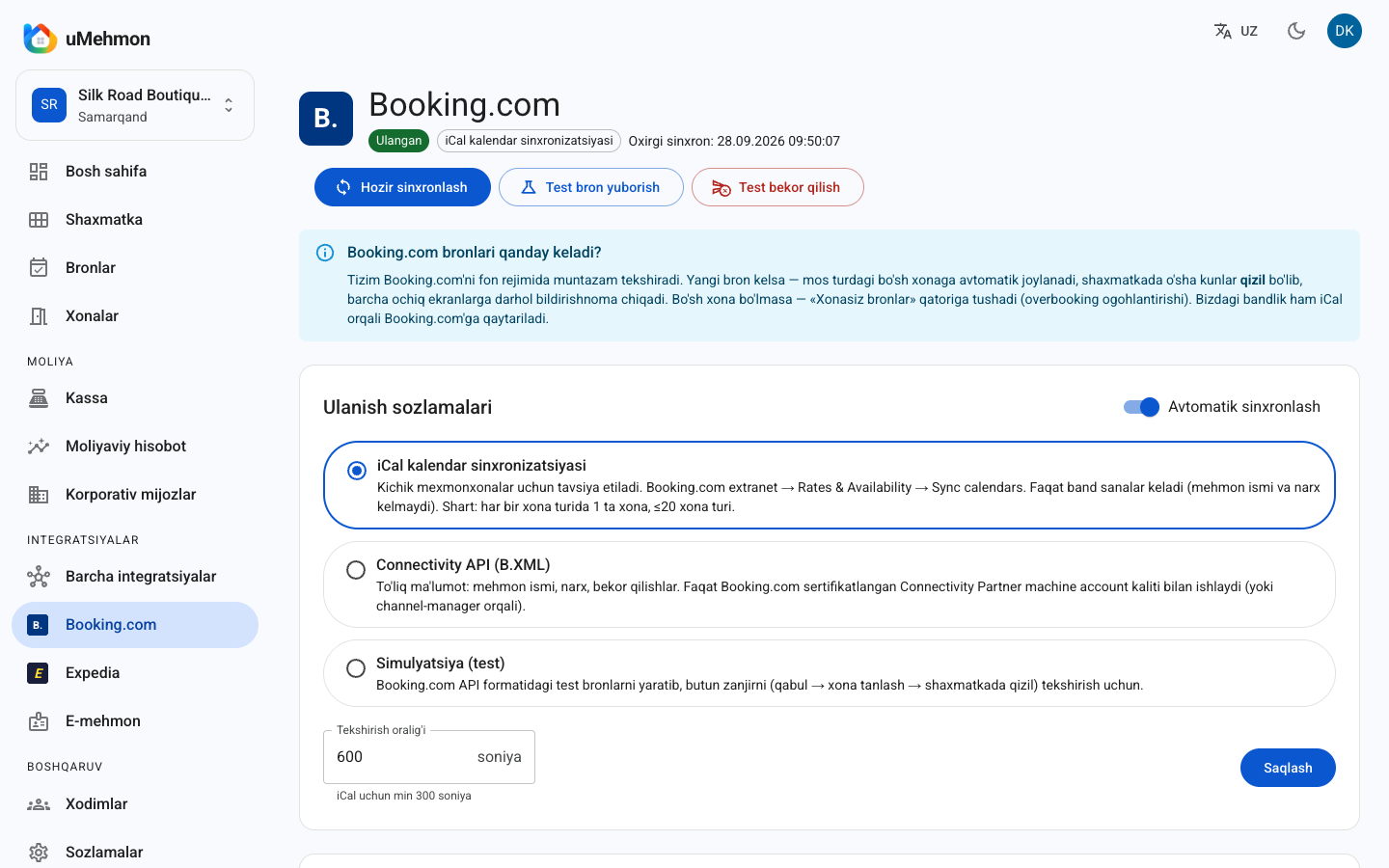
- In the background, the system regularly polls the Booking.com or Expedia calendar. You set the polling interval; the minimum for iCal is 300 seconds.
- A new reservation is matched to the uMehmon room type that is mapped to the OTA room.
- The booking is automatically assigned to a free room of that type, so nobody at the desk has to pick a room.
- The dates turn red on the tape chart, and everyone with the screen open sees the change live.
- A notification appears on all screens, so managers and front desk staff know about the booking at once.
- If no room of that type is free, the booking lands in the unassigned bookings row and an overbooking warning is shown.
How is availability pushed back to the OTA?
uMehmon generates its own iCal export link for each room type. That feed marks as closed every date on which all rooms of the type are occupied. You import the link into the Booking.com or Expedia extranet once, and the OTA then reads it on its own schedule. A room sold over the phone or taken by a walk-in guest therefore closes on the OTA too.
A useful detail: when a guest checks out early, the remaining nights are released, and the export reflects that, so the room goes back on sale.
How are cancellations detected?
In iCal mode the OTA simply removes a cancelled booking from its calendar. On the next sync, uMehmon finds confirmed bookings from that channel that are no longer in the feed and marks them as cancelled. The room frees up on the tape chart.
Which channels are connected? An honest status table
Many vendors promise "hundreds of channels". We prefer to state exactly what works today, what is waiting on certification and what is planned.
| Channel | Connection method | Status |
|---|---|---|
| Booking.com | Two-way iCal sync | Live now |
| Booking.com | Connectivity API (B.XML) | Available with a certified connectivity account |
| Expedia | iCal (Partner Central linked calendars) | Live now |
| Expedia | Expedia Connectivity API | After Expedia certification |
| Agoda | API | On the roadmap (coming soon) |
| Airbnb | API | On the roadmap (coming soon) |
| Trip.com | API | On the roadmap (coming soon) |
| Hostelworld | API | On the roadmap (coming soon) |
| Traveloka | API | On the roadmap (coming soon) |
| Google Hotels | — | On the roadmap (coming soon) |
| Tripadvisor | — | On the roadmap (coming soon) |
Hotels.com belongs to Expedia Group, and properties listed through Expedia Partner Central are generally shown across Expedia Group sites as well. Check your Expedia agreement for the exact list of sites.
Our plans for Airbnb are covered in the Airbnb integration article.
iCal vs API vs manual updates: comparison
The most important question when choosing a channel manager is which technology the connection uses.
| Criterion | Manual (each extranet separately) | iCal sync | Connectivity API |
|---|---|---|---|
| Bookings reach the PMS | No, typed in by hand | Yes, as blocked dates | Yes, with full details |
| Guest name and phone | Copied from the extranet | Not included | Included |
| Price and booking total | Copied from the extranet | Not included | Included |
| Availability sent to OTA | Closed by hand | Yes, as closed dates | Yes, with room counts |
| Rate push to OTA | Manual | No | Yes |
| Speed | Depends on staff | Minutes to hours | Seconds to minutes |
| Double-booking risk | High | Low, but not zero | Lowest |
| Requirements | None | Extranet setup | Certified account |
| Best fit | 1–3 unit rental | Small hotel, guest house | Mid-size and large hotels |
In short: iCal is a fast, dependable start for small properties, while an API gives full automation. uMehmon supports both in the same screen, so you can start with iCal and switch to the API later.
iCal limitations you should know about
iCal is an open calendar format. It is simple and supported by almost every OTA, but its limits are real:
- Only blocked dates come through. Guest name, phone, price and booking details are not included. uMehmon creates the booking with a label such as "Booking.com guest", and you check the rest in the extranet.
- It is not real-time. Both sides read the calendar at intervals. Booking.com refreshes external calendars roughly every few hours, so a short blind window exists.
- Booking.com eligibility. Booking.com calendar sync is typically available for properties with one unit per room type and no more than 20 room types, and without a connectivity provider linked to the account.
- No rates or restrictions. Minimum stay, rates and discounts stay in the extranet.
That is why hotels with many identical rooms are better served by an API in the long run. The full Booking.com walkthrough is on the Booking.com integration page.
Q&A: real-world situations
Question: A booking came in at 2 a.m. and nobody was at the desk. What happens? Answer: Nothing needs to be done. The system runs in the background: the booking is assigned to a free room, turns red on the tape chart, and staff see it ready in the morning.
Question: A guest booked by phone. Will the room close on Booking.com? Answer: Yes, if every room of that type is now occupied. Those dates are closed in the uMehmon export feed, and Booking.com closes them on its next read.
Question: If I move a booking to another room, does the sync break? Answer: No. You can drag a booking to another room on the tape chart; channel mapping works at room-type level, so the booking stays linked to its channel.
Question: How do I find out about a sync error? Answer: The integration card switches to an error status, and the sync log records every attempt with its time, result and the number of new, updated and cancelled bookings.
Numbers and formulas: how to measure the value of a channel manager
We do not quote invented "industry studies". Instead, here are formulas you can apply to your own numbers.
| Metric | Formula | Why it matters |
|---|---|---|
| OTA share | OTA room revenue / total room revenue × 100% | How dependent you are on OTAs |
| Direct share | Direct booking revenue / total room revenue × 100% | Commission-free sales |
| Commission cost | OTA booking value × commission rate | The true cost of a channel |
| Manual update time | Updates per day × minutes per update × 30 | Staff workload |
| Occupancy | Room nights sold / room nights available × 100% | Overall utilization |
Example 1: a 20-room hotel has 600 room nights available in a month and sells 390 → Occupancy = 390 / 600 = 65%.
Example 2: monthly room revenue is 100,000,000 UZS, of which 55,000,000 UZS comes through OTAs → OTA share = 55%. If your contract commission is 15%, commission cost = 55,000,000 × 0.15 = 8,250,000 UZS. (The rate is only an example; use the one in your agreement.)
Example 3: the front desk updates two extranets 10 times a day at 3 minutes each → 10 × 3 × 30 = 900 minutes, or 15 hours a month. That is the time a channel manager gives back.
OTA share, direct share, Occupancy, ADR and RevPAR are calculated automatically in uMehmon hotel analytics, because channel data and reservations live in the same system.
Pros and cons
Pros
- Built into the PMS: no paying for two products and wiring them together.
- Automatic room assignment: OTA bookings land in a free room of the right type.
- Live tape chart: new bookings turn red instantly for every user, with a notification.
- Overbooking warning: if no room is free, the booking is not lost; it waits in the unassigned row.
- Test mode: simulate the entire flow without risking real reservations.
- Transparency: the sync log and activity log keep every change.
- Security: API credentials are stored encrypted, and only administrators can change settings.
- Built for Uzbekistan: E-mehmon registration and a multi-currency cash desk in the same system.
Cons and limitations
- Only two OTAs (Booking.com and Expedia) are connected today; Agoda, Airbnb, Trip.com and others are on the roadmap.
- iCal mode does not deliver guest names or prices, and syncing is not instant.
- API connections require a certified account, which takes time.
- There is no rate push over iCal and no automated dynamic pricing yet.
- OTA integrations are disabled in hostel mode; only E-mehmon runs.
- The Start plan does not include the Channel Manager.
- The interface is available in Uzbek and Russian; an English interface is not available yet.
Setting up the Channel Manager in uMehmon: step by step
Setup takes a few steps and requires no technical background.
1. Structure your room types. Each OTA room type should match one room type in uMehmon. If Booking.com lists a "Standard Double", create the same type in uMehmon and assign its rooms.
2. Open Integrations. You will see cards for Booking.com, Expedia and E-mehmon, each with a status: connected, test mode, disabled or error.
3. Pick a mode. iCal is recommended for small properties. If you have a certified Booking.com connectivity account, use the Connectivity API (B.XML). To try things first, use simulation.
4. Map your rooms. Each room type row has two links: the OTA iCal import link (you paste it) and the uMehmon export link (you copy it and import it into the OTA). For Booking.com this is done in the extranet under Rates & Availability → Sync calendars; for Expedia, in Partner Central under Rooms and rates → Manage linked calendars.
5. Test. The "send test booking" button creates a booking as if it came from the OTA. Check the tape chart: it should turn red in a room of the right type. Then run a test cancellation.
6. Turn on automatic sync. Set the interval and watch the sync log for the first week. Use "sync now" whenever you want an immediate check.
A step-by-step Booking.com guide is also available in how to connect Booking.com.
Which plan includes the Channel Manager?
| Plan | Monthly price | Rooms | Staff users | Channel Manager |
|---|---|---|---|---|
| Trial | Free for 14 days | Up to 30 | — | Included (all features) |
| Start | 290,000 UZS | Up to 10 | 2 | Not included |
| Pro | 590,000 UZS | Up to 40 | 10 | Included |
| Business | 990,000 UZS | Up to 300 | 50 | Included |
If your hotel sells through OTAs, Pro is the logical starting point: a single avoided overbooking often costs more than a month's subscription once you add relocating the guest, refunds and a negative review.
What to look for when choosing a channel manager
The market offers standalone channel managers and modules built into a PMS. Ask any vendor these questions:
- Which channels are live today and which are only promised? Ask for the connection method (iCal or API) for each one.
- How does it connect to the PMS? A standalone channel manager talks to your PMS through yet another integration, which is one more point of failure.
- Local compliance: in Uzbekistan, registering guests in E-mehmon is mandatory, and international tools usually do not support it.
- Language and currency: is there a Russian or Uzbek interface, and does the cash desk handle UZS and foreign currency together?
- Is there a test mode? Being able to rehearse without real bookings matters.
- Transparency: is there a sync log and are errors surfaced?
uMehmon answers each of these openly: two OTAs today, inside the PMS, with E-mehmon, in Uzbek and Russian, with a test mode and logs.
Who is it for?
- Small hotels and guest houses (5–40 rooms) selling on Booking.com and Expedia, who can go live on iCal in an evening.
- Apart-hotels, where each apartment is often a single unit, so iCal limits barely apply.
- Mid-size hotels preparing for an API connection, who can run on iCal today and switch modes later.
- Owners of several properties, with multiple hotels in one account, each with its own channels and isolated data.
Conclusion
Any hotel selling through OTAs needs a channel manager: it saves time, reduces double bookings and brings every reservation onto one tape chart. In uMehmon it works together with the PMS, E-mehmon, the cash desk and analytics. Booking.com and Expedia connect over iCal today, API connections are enabled with a certified account, and other channels are on the roadmap. We would rather tell you that up front.
Start a 14-day free trial: sign up, add your room types and see your first simulated booking on the tape chart within minutes.
How to set up the Channel Manager in uMehmon
- 1
Sign up
Create an account at umehmon.uz/register to start a 14-day free trial with every feature unlocked.
- 2
Add room types and rooms
In settings, create room types (Standard, Deluxe and so on) and add the rooms in each type; the tape chart builds itself.
- 3
Open the integration and choose a mode
In Integrations, open the Booking.com or Expedia card and pick a connection mode: iCal, Connectivity API or simulation (test).
- 4
Map your room types
For each room type, paste the iCal export link from the OTA extranet into the import field, then copy the uMehmon export link and import it into the OTA.
- 5
Run a simulation
Send a test booking, confirm it lands in a free room of the right type and turns red on the tape chart, then test a cancellation.
- 6
Turn on automatic sync
Enable automatic sync, set the polling interval and keep an eye on the sync log during the first days.
Frequently asked questions
A channel manager is a module that automatically synchronizes a hotel's availability and reservations with online travel agencies (OTAs). It reduces the risk of selling the same room twice and saves staff from updating every extranet by hand.
Booking.com (two-way iCal sync) and Expedia (iCal) work today. The Booking.com Connectivity API (B.XML) is available with a certified connectivity account, and the Expedia API will be enabled after Expedia certification. Agoda, Airbnb, Trip.com, Hostelworld, Traveloka, Google Hotels and Tripadvisor are on the roadmap.
iCal only transfers blocked dates: guest names, prices and booking details are not included, and syncing is not real-time. An API such as Booking.com B.XML transfers guest data, prices and cancellations in full and much faster, but it requires a certified connection.
It greatly reduces the risk, but in iCal mode there is a short window between syncs. If no free room is available, uMehmon places the booking in the unassigned bookings row and shows an overbooking warning so staff can act immediately.
The Channel Manager is included in the Pro plan (590,000 UZS per month, up to 40 rooms) and the Business plan (990,000 UZS per month, up to 300 rooms). It is not part of the Start plan. The 14-day free trial unlocks every feature, including the Channel Manager.
When hostel mode is enabled, E-mehmon is the only integration that runs in uMehmon. Selling individual beds through OTAs is not supported yet; a Hostelworld integration is on the roadmap.
Yes. uMehmon has a simulation (test) mode that creates bookings as if they came from Booking.com or Expedia. The booking is assigned to a free room and turns red on the tape chart, and you can also test how a cancellation is received.
Not in iCal mode, because iCal only carries availability as closed dates, so you manage rates in the OTA extranet. Rate and inventory pushes run through API connections, which are enabled once a certified account is in place.
Try uMehmon free for 14 days
Tape chart, reservations, cash desk, E-mehmon and Booking.com — in one platform. No credit card required.
Start free trial